Fix Text-to-Speech on Android
Follow this step-by-step guide to enable TTS so your child can hear letters, numbers, and words in Sikho Kids.
Sikho Kids uses your device's built-in Text-to-Speech engine to speak words aloud in your selected language. If you don't hear any audio, follow the steps below to enable it.
Open the Settings app on your Android device. You can find it in your app drawer or by swiping down on the notification bar and tapping the ⚙️ gear icon.
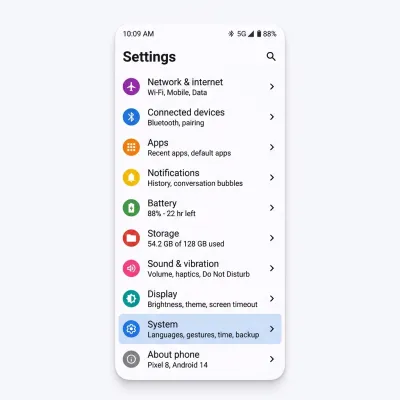
Scroll down and tap "System".
Inside System settings, tap "Languages & input".
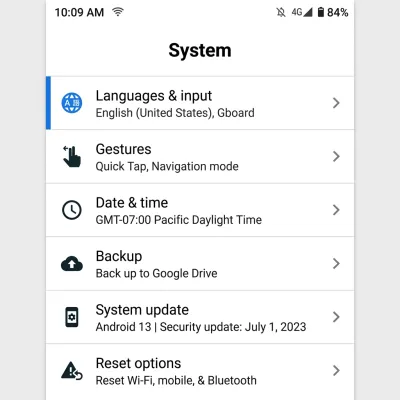
Inside Languages & input, look for "Text-to-speech output" or "Text-to-speech" and tap on it.
On the Text-to-speech output screen, make sure "Google Text-to-Speech Engine" (also called "Speech Services by Google") is selected as the preferred engine.
If it's not installed, you can download it for free from the Google Play Store →
To hear words spoken in your selected language, you need to install the matching voice pack. For example, if you chose Hindi in Sikho Kids:
- Tap the ⚙️ gear icon next to Google TTS Engine
- Tap "Install voice data"
- Find and tap your language — e.g. "हिन्दी (Hindi - India)"
- Tap the download ⬇️ icon to install the voice pack
- Wait for the download to complete (requires internet)
Go back to the main Text-to-speech settings screen and tap "Play" or "Listen to an example" button. You should hear a sample sentence spoken aloud.
You can also adjust the:
- Speech rate — How fast the voice speaks (set to a slower speed for kids)
- Pitch — How high or low the voice sounds
That's it! Now open the Sikho Kids app, select your preferred language, and tap on any letter, number, or word. You should hear it spoken aloud in your chosen language. 🎉
If you still don't hear audio, make sure your device volume is turned up and the phone is not in silent/vibrate mode.
📱 Quick Path for Your Phone Brand
The TTS setting location varies by manufacturer. Here's the quick path for popular brands:
Frequently Asked Questions
Make sure your media volume is turned up (not just the ringer volume). Press the volume up button on your phone, then tap the volume slider icon to expand all volume controls and increase the Media slider.
Also ensure your phone is not connected to Bluetooth headphones or a speaker that might be receiving the audio output.
Make sure you have the latest version of Google Text-to-Speech from the Play Store. Google regularly updates voice quality for all supported languages. Go to Play Store → search "Speech Services by Google" → tap Update.
Some phones come with a different TTS engine (like Samsung TTS). You can install Google's engine for free: Download from Play Store →
Yes! On Android TV, go to Settings → Device Preferences → Accessibility → Text-to-speech output. The same Google TTS engine works on Android TV devices.
Once the voice data is downloaded, TTS works completely offline. You only need internet to initially download the voice packs. After that, your child can learn anywhere — even without Wi-Fi!
Ready to Start Learning?
Download Sikho Kids and let your child explore learning in their preferred language with interactive audio!
Download Sikho Kids